
Change the Signature on Your Emails
Your report emails can end with your own signature: your name, phone number and email address. You set it once, and every report email you send picks it up.
Before you start: why you might see two signatures
Section titled “Before you start: why you might see two signatures”Your report email may already have a sign-off typed into it, for example:
Best Regards, Your Company Name 555.123.4567 you@example.com
That typed text is part of the email, not your signature. Changing your profile does not change it. If you set a signature and leave the typed lines in, your clients get both.
The steps below replace the typed lines with your signature, so there is only one.
Step 1 — Set your signature
Section titled “Step 1 — Set your signature”- Click your name at the top right.
- Click Your profile.
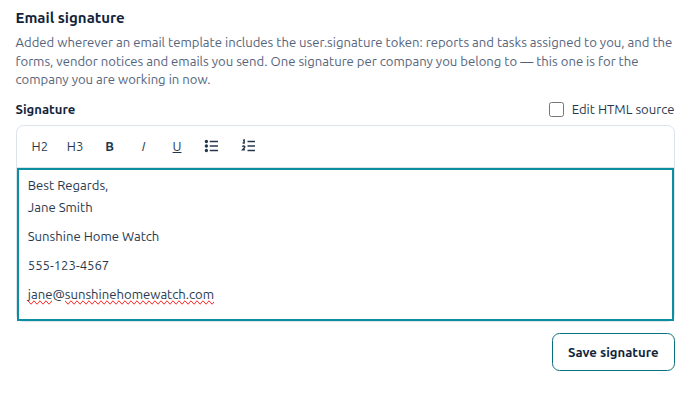
- Scroll down to Email signature.
- Type your signature: name, company, phone, email.
- Click Save signature.
Step 2 — Put your signature in the report email
Section titled “Step 2 — Put your signature in the report email”-
Click Lists in the left menu, then the Email Templates tab.
-
Click Report email.
-
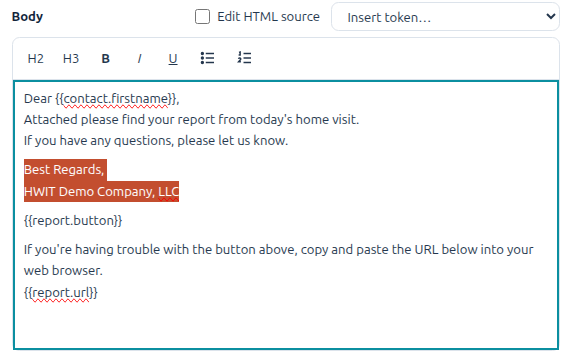
In the message, delete the old sign-off lines (“Best Regards,” and the lines under it).
-
Click where those lines were.
-
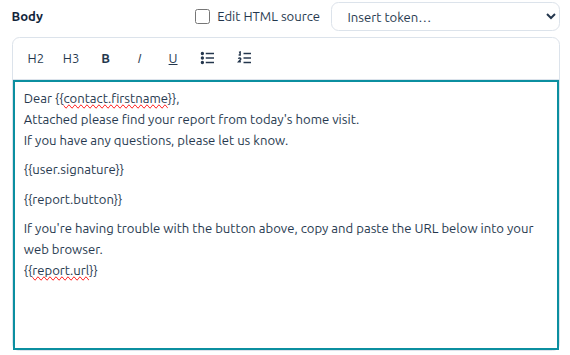
Open Insert token… (above the message) and pick {{user.signature}} under User.
-
Check the Preview on the right. You should see one signature.
-
Click Save.
Step 3 — Do the same for the Task email
Section titled “Step 3 — Do the same for the Task email”Tasks send their own email. Open Lists → Email Templates → Task email and repeat Step 2.
Good to know
Section titled “Good to know”- Each person sets their own. A report email uses the signature of the person assigned to the visit. Ask each of your staff to do Step 1.
- No signature saved? That spot is simply left empty. Nothing breaks.
- More than one company? Set a signature in each one.
- Invoices and receipts never carry a personal signature.
I changed my signature but my emails still show the old details. The old details are typed into the report email. Do Step 2.
My emails show two signatures. One is typed into the report email, the other is your signature. Do Step 2 to remove the typed one.
Want more? See Email Templates for everything you can change in your emails.