Advanced: Connecting a Form by Webhook
A webhook lets a form or a tool such as Zapier send each submission straight into Leads. This page is for whoever looks after your website.
Step A: Get the URL and key (Admin)
Section titled “Step A: Get the URL and key (Admin)”- Go to Settings → Integrations and click Leads.
- Under Webhook, copy the URL.
- Click Generate key and copy the Key straight away. It is shown only once.
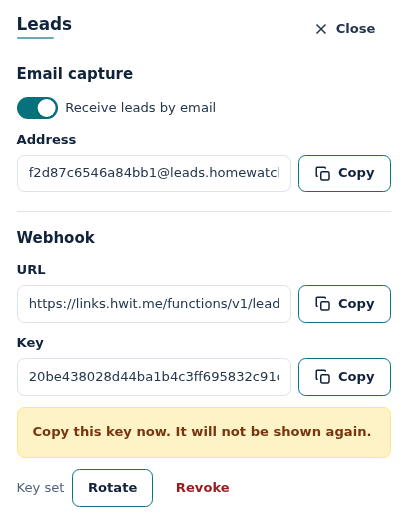
Give the URL and key to your web designer. Treat the key like a password.
Step B: Send the form to the URL
Section titled “Step B: Send the form to the URL”Send a POST to the URL with:
- the header
X-Lead-Key: <your key> - a JSON body with any of these fields:
| Field | What goes in it |
|---|---|
firstName | First name |
lastName | Last name |
email | Email address |
phone | Phone number |
propertyName | Property name, if they gave one |
address | One line, or { "street", "line2", "city", "region", "postalCode", "country" } |
message | What they wrote |
source | website, email, phone, referral, realestateagent (Real Estate Agent), api or other (default website) |
externalSubmissionId | Your form’s own ID for the submission. If it is sent twice, only one lead is made. |
A first name or last name is required. Without one, the submission is refused.
Example:
{ "firstName": "Margaret", "lastName": "Collins", "email": "margaret.collins@example.com", "phone": "(239) 555-0142", "address": "418 Gulf Shore Blvd, Naples FL 34102", "message": "We need weekly checks from May to October.", "externalSubmissionId": "form-1234"}Step C: Check the answer
Section titled “Step C: Check the answer”| Answer | Meaning |
|---|---|
201 | Lead created. |
200 with "duplicate": true | Already received this externalSubmissionId. No new lead. |
401 | Key missing or wrong. |
422 | No first or last name. Nothing was created. |
429 | More than 60 leads in an hour. Try again later. |
Lost or leaked key
Section titled “Lost or leaked key”- Rotate gives you a new key. The old one stops working at once, so update your form.
- Revoke turns the webhook off until you generate a new key.
Frequently Asked Questions
Section titled “Frequently Asked Questions”Can I see the key again? No. Click Rotate to get a new one.
Does a webhook lead send the “New lead” email? Yes, to your company’s primary user, the same as an email lead.