Editing a Report Template
You can get to your list of report templates on the Lists screen. Click Lists and the first tab shows all of your templates.
From this screen you can go in and edit the templates themselves. Click into the template to change any HWIT info, or if you wish to edit the construct of the template itself click on the Edit Template button.
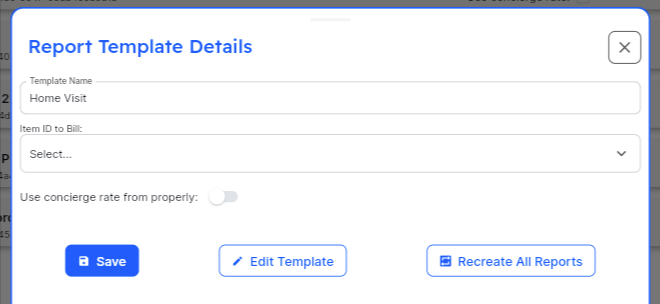
For MonitorQA and SafetyCulture templates, it is important to understand how edits to the templates work. When reports are created, usually via a Schedule but also if you create them directly from the New Report screen, they are created with the version of the template that is active at the time that the report is created. If you make a change to the template it is not reflected on existing reports, only on reports created after the template change is saved. Should you make a template change that you wish to have immediate effect on all Pending Reports, you can use the button on the screen that says “Recreate All Reports” — this will recreate all Pending, or not completed, Reports using your updated template.
For HWIT Integrated Reporting — template changes are pushed to your technicians in realtime, so no report recreation is required.
One other item regarding MonitorQA templates: MonitorQA updated HWIT when a new template is saved or published the first time. Any changes you make to the template after that are not automatically sent to HWIT. This is normally not an issue, except in the case that you change the name of the template in MonitorQA. If you change the name there, it is not automatically updated in HWIT. You can easily update the name on the screen here, or you can run the Sync All Templates routing on the Integration Screen which will update everything for every template at once. If you feel like your template is not reflected at all, it is most likely due to the fact that you changed the name after it was already synced and is not automatically renamed after the initial sync. You can use this button/process to update all templates and make sure that the names are all in sync between systems.