Tasks vs Reports - definition
It is important to know that you have two different ways to schedule items in Home Watch IT. Although they are both very similar there are 2 important differences so that you know which item you wish to schedule. Once you schedule an item you cannot switch its type between the two.
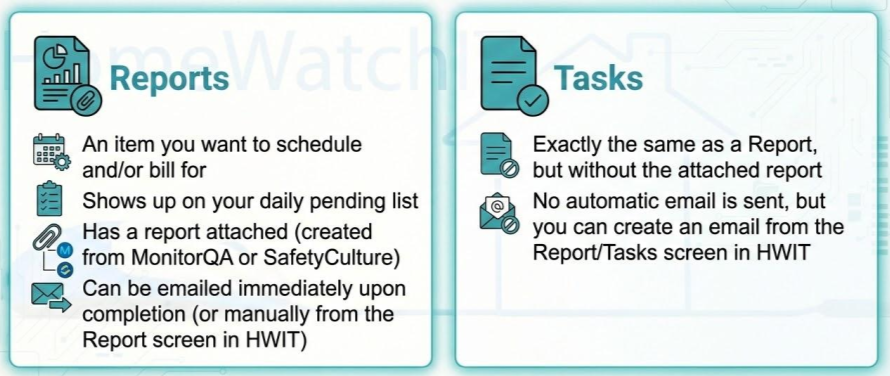
You’ll notice that Tasks do not send an automatic email — that is due to the fact that you may want to send a custom message to the customer when completing the Task. You can do so by going to the Reports/Tasks list, opening the completed Task, and entering the information into the email fields provided — then push Send! Easy.
Note that when Sending, if the customer is using the Customer App (Access), they will receive a push notification to their app notifying them the task is complete.
Note that once you create a Report or Task you cannot change its type — you must delete and recreate it as they are handled differently depending on the type selected.
-
Reports
-
An item you want to schedule and/or bill for
-
Shows up on your daily pending list
-
Has a report attached (created from MonitorQA or SafetyCulture)
-
Can be emailed immediately upon completion (or manually from the Report screen in HWIT)
-
Tasks
-
Exactly the same as a Report, but without the attached report
-
**No automatic email is sent, but you can create an email from the Report/Tasks screen in HWIT)
It is ideal to use Tasks for simple items that do not require generating a report, such as “Taking trash cans from the curb”, “Picking up mail or post”, and other event that does not require an actual report.**
Attaching a vendor
Section titled “Attaching a vendor”When you create a Report or Task, you can also pick a vendor for it. Use this when an outside company — like a pool company or an HVAC company — is the one doing the work, not your own team. This just keeps track of who is responsible; it does not send them anything or bill them automatically.