Assignment Alerts on the Phone
When you give someone new work, they should know about it, even if the app is closed on their phone. Assignment alerts send them a phone notification.
Turning it on for a user
Section titled “Turning it on for a user”You need to be an Admin.
- Go to Settings → Account.
- Under Your Users, click the user.
- Turn on Assignment alerts on phone.
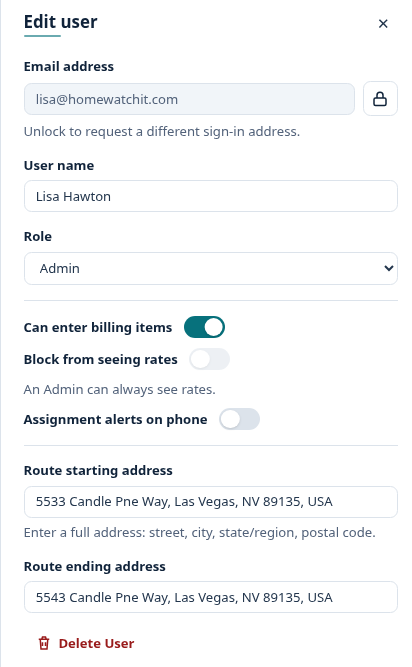
It is off for everyone until you turn it on. Turn it off the same way.
The user must have signed in to the mobile app at least once and allowed notifications on their phone.
What sends an alert
Section titled “What sends an alert”- Someone assigns or reassigns a Report, Task or Action to this user.
What does not
Section titled “What does not”- Visits a schedule creates. A new weekly schedule would otherwise send 52 alerts.
- Work you assign to yourself.
- Work added by an import or a conversion.
- Work that is already completed, or a visit dated before today.
- A new Urgent Action. The urgent alert already tells the person.
Fewer, smarter alerts
Section titled “Fewer, smarter alerts”- Several at once become one. Reassign a whole day of 15 visits and the person gets one notification: “15 new assignments”.
- Changed your mind? An alert waits two minutes. Assign something by mistake and change it back straight away, and nothing is sent.
- No repeats. The same work assigned to the same person twice in one day alerts once.
- Quiet at night. Anything assigned between 9pm and 7am your company’s time arrives at 7am.
Tapping the notification opens the app.