Introduction to Forms & Agreements
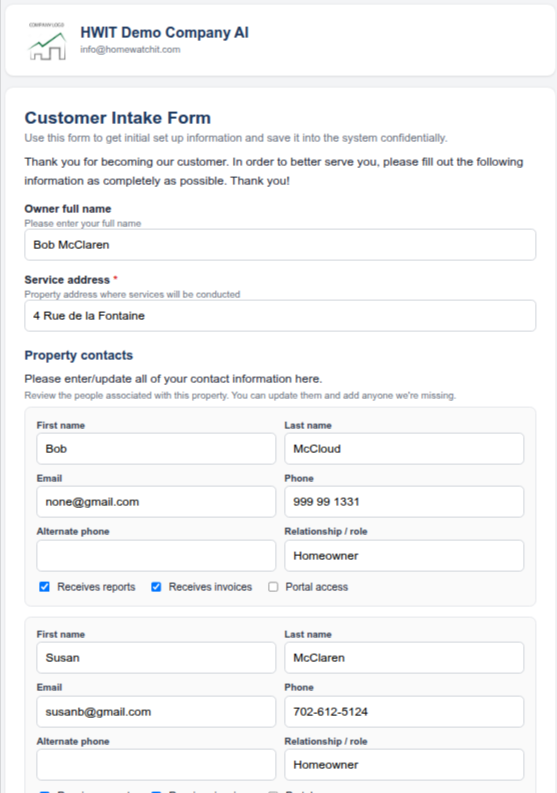
Forms and Agreements let you send a customer a secure, personalized link. The customer opens it in any browser, completes the information or signing step, and submits it. Home Watch IT saves mapped answers, files a PDF under the customer’s Attachments, and can notify your office when the submission is complete.
Forms vs. Agreements — what’s the difference?
Section titled “Forms vs. Agreements — what’s the difference?”They are built and sent in the same general way. The difference is what the customer must do and what the result contains.
| Form | Agreement | |
|---|---|---|
| Purpose | Collect or update information | Have the customer read and sign a document |
| Typical use | New customer intake, gate codes, alarm information, contacts, property details | Service contract, terms of service, authorization |
| Customer signs? | No | Yes — types their name and draws a signature |
| Result | Saved information plus a PDF summary | A signed PDF with a signature certificate page |
A simple way to remember it: a Form gathers answers; an Agreement gets a signature.
The big picture
Section titled “The big picture”- Build a template on the Lists screen and publish it.
- Send it to a customer from that customer’s screen.
- The customer opens the link and sees your company’s name and logo. Non-sensitive information already on file can be pre-filled.
- The customer submits the Form, or submits and signs the Agreement.
- Home Watch IT saves the result, updates mapped customer or contact information, creates a PDF, files it under Attachments, and emails your office that it is done.
Which building block should I use?
Section titled “Which building block should I use?”A template is a stack of items. Choose the item that matches the information you want the customer to see or provide:
| I want to… | Use | Notes |
|---|---|---|
| Show a heading, instructions, or contract wording | Add Text | The customer reads it but cannot type into it. |
| Ask one question and save the answer | Add Field | One question and one answer. |
| Collect a second owner, spouse, property manager, or contractor | Add Contacts | Handles people and lets the customer add contacts. |
Next step
Section titled “Next step”Continue with Building Forms & Agreements for the complete guide to settings, fields, write-back destinations, sensitive values, contacts, previewing, publishing, sending, and the submission result.
Frequently asked questions
Section titled “Frequently asked questions”Can a Form collect a signature?
Section titled “Can a Form collect a signature?”No. Use an Agreement when the customer must sign. The template type is selected when the template is created and cannot be changed afterward.
Does the customer need an app?
Section titled “Does the customer need an app?”No. The customer opens the secure link in a browser on a phone, tablet, or computer.
Are sensitive values shown in the PDF or email?
Section titled “Are sensitive values shown in the PDF or email?”Sensitive values such as gate codes and alarm passwords are redacted. The detailed guide explains how to mark fields as sensitive and how existing values are preserved.
If sensitive information is protected and not uploaded to the property, how do I see it during a home watch?
Section titled “If sensitive information is protected and not uploaded to the property, how do I see it during a home watch?”Sensitive information is protected from the customer-facing form, PDF, and notification email — it is not removed from HWIT. Authorized staff can view the live value in the HWIT app by opening the property and selecting the Security tab. Use that in-app record while you are in the field; you do not need to store the information outside HWIT.
Are sensitive values available in the HWIT app when I am out in the field?
Section titled “Are sensitive values available in the HWIT app when I am out in the field?”Yes. Sensitive values remain available to authorized staff in the property’s Security tab. “Sensitive” means hidden from public/customer-facing outputs, not unavailable inside HWIT to the team that manages the property.
Can I reuse a template?
Section titled “Can I reuse a template?”Yes. Build and publish a template once, then send it to as many customers as needed.