
Mass Creating Reports
This feature allows you to generate multiple reports of the same type in a single action, providing greater efficiency and flexibility.
It’s especially useful in situations such as an approaching storm, where you may need to create “Pre-Storm” reports for all your customers at once—helping you prepare quickly and respond proactively to the event.
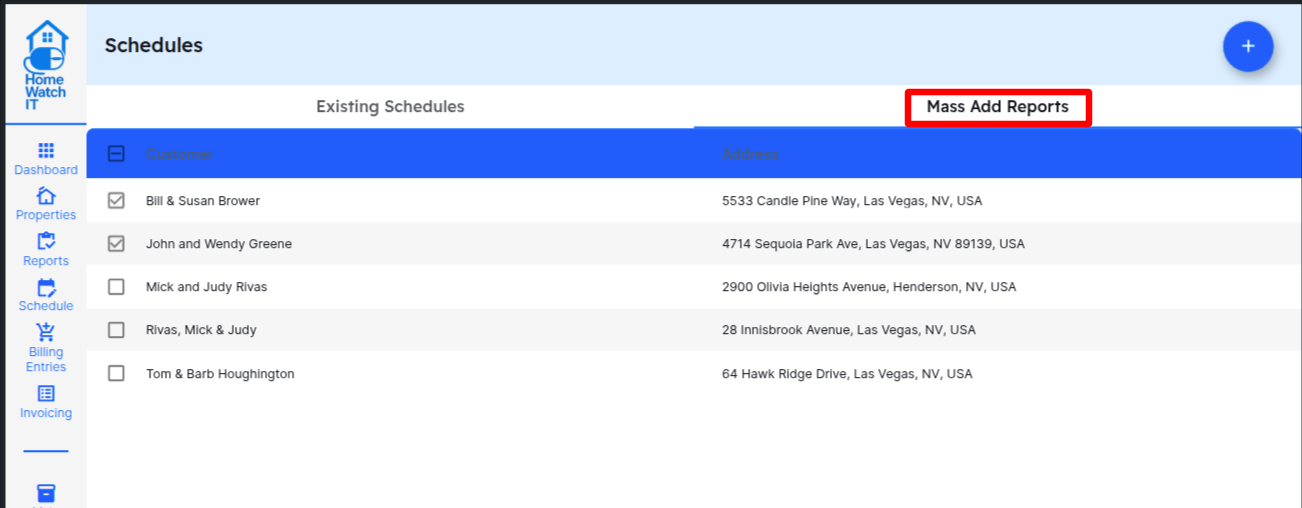
Start by going to the Schedules screen, and select the tab labelled Mass Add Reports.
Select the customers that you want to create reports for — you can click all or any number of the clients you wish. When ready, click the blue + in the upper corner of the screen.
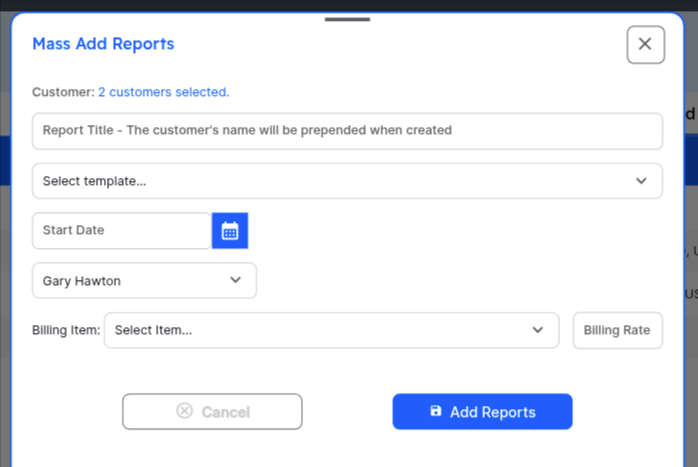
Enter the information as appropriate. Note that whatever you enter in the Report Title field will be prepended by the customer’s name. So for example if you put “Pre-Hurricane Check” as the report title, the report will be titled “Joe & Jane Smith - Pre Hurricane Check”.
Enter the date, assignee, billing information for this report, and click Add Reports. The system will immediately create the reports for you.