
Response Sets: The Answers a Technician Can Pick
What is a Response Set?
Section titled “What is a Response Set?”A Response Set is the list of answers a technician can pick for a question. Yes / No, Pass / Fail and a Checklist (✓ / ✗) are Response Sets. So is your own list, like Excellent / Good / Needs Attention.
One set can be used by many questions, in all of your templates. Build it once, use it everywhere.
Where to find them
Section titled “Where to find them”There are two ways in:
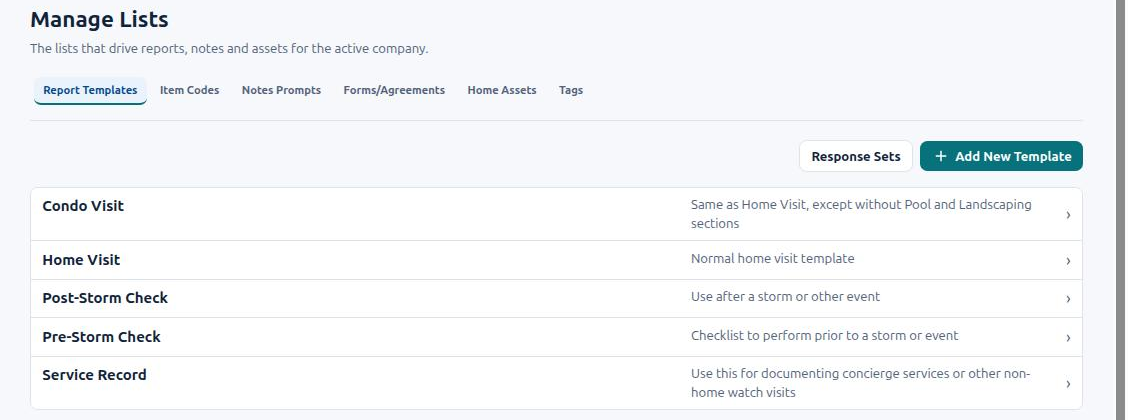
- From the Lists screen: go to Lists → Report Templates and click Response Sets.
- From a question: in the template editor, click the pencil beside a question. In the Answer card you’ll see the Response type box, a pencil and + New Response Set.
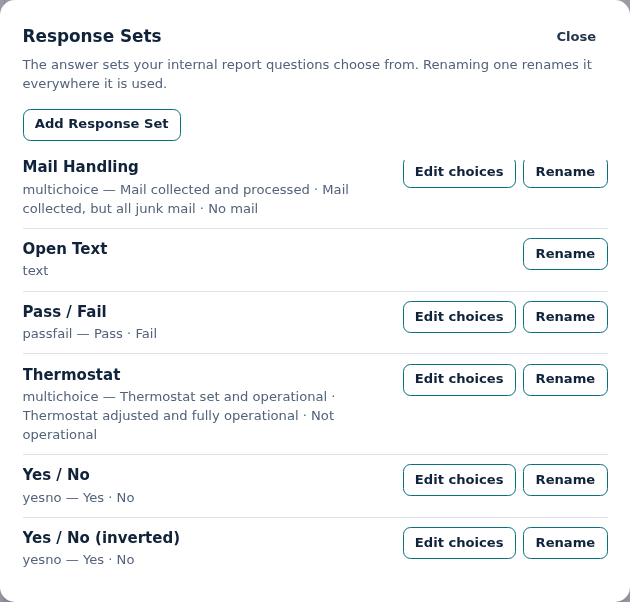
The Response Sets window lists every set your company has. Under each name you see its type and its answers.
Create a Response Set
Section titled “Create a Response Set”Example: you want to report on weed growth around a pool lanai.
- Go to Lists → Report Templates and click Response Sets.
- Click Add Response Set.
- Type a Name, for example Weed Growth.
- Pick a Category (the kind of list):
- Multiple Choice — the technician picks one answer. Best for a rating or a status.
- Multi-Select — the technician ticks as many as apply. Best for Which appliances were run? or Which areas were serviced?
- Click Create.
- Click Edit choices on the new set.
- Click Add choice for each answer. Type its Choice label, pick its color, and set its AI meaning (see below).
- Drag the answers into the order you want. Click Done when you’re finished.
Changes save as you go. Your new set is now available in every template.

Shortcut from a question: click + New Response Set in the question’s Answer card. Give it a name and category, click Create, and the question uses it straight away.
Each answer has three parts
Section titled “Each answer has three parts”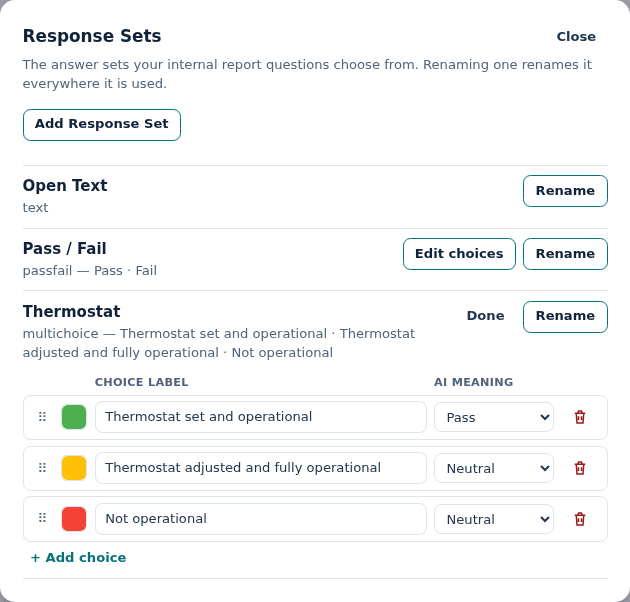
- Choice label — the words the technician taps and the client reads.
- Color — how the answer looks on the report. Use green for good and red for problems.
- AI meaning — tells Complete with AI which answer means “fine”: Pass, Neutral or Fail. Set it on every answer so the AI marks the right one. See Completing a Report with AI.
On the report, a Multi-Select answer shows one colored badge for each answer picked. If just one of them is marked as a problem, the report is still flagged.
Editing a set changes every question that uses it
Section titled “Editing a set changes every question that uses it”Response Sets are shared across your company. That is what makes them handy — and why to take care.
- Edit choices or Rename in the Response Sets window changes every question in every template that uses that set.
- Want a change for one question only? Create a new set instead, and pick it on that question.
- Editing an answer inside one question’s panel is different: HWIT makes a private copy of the answers for that question only. The shared set is not changed.
- Archive (from the question’s pencil) removes a set for good. It can’t be undone. You can’t archive a set that other questions still use — switch them to another set first. You also can’t archive your last remaining set.
Open Text and Display Only
Section titled “Open Text and Display Only”Open Text and Display Only are in the Response Sets list, but they have no answers to pick:
- Open Text — the technician types whatever they want.
- Display Only — puts your own text or picture on the report. The technician answers nothing.
So they have no Edit choices button. You can only rename them.
Frequently Asked Questions
Section titled “Frequently Asked Questions”If I change the colors on Yes / No, will all my templates change? Yes. Every question using that set, in every template, gets the new colors.
I only want different answers on one question. What do I do? Create a new Response Set (or use + New Response Set on that question). Or edit the answers in that question’s panel — HWIT then makes a copy just for that question.
What’s the difference between Multiple Choice and Multi-Select? Multiple Choice = pick one. Multi-Select = pick as many as apply.
Do I have to set the AI meaning? It’s best to. Complete with AI uses it to decide which answer means “fine” and which means a problem.
Can I use a Multi-Select question to show or hide other questions? No. It can hold several answers at once, so it can’t control another question. Use Multiple Choice for that. See Advanced Template Editing.
Can I delete a Response Set? You can archive one from a question’s pencil, as long as no other question uses it. Archiving can’t be undone.
Where do I pick the Response Set for a question? In the template editor, click the question’s pencil. Pick it in Response type in the Answer card. See Building and Managing Templates.