
Home Watch IT Invoicing
What is HWIT Invoicing?
Section titled “What is HWIT Invoicing?”HWIT Invoicing is the built-in billing tool inside the HomeWatch IT platform. It lets you create professional invoices for your clients, send them by email with a PDF attachment, collect payment online via Stripe, and keep a full record of what’s been paid — all without leaving the platform. There’s no need for a separate accounting application to handle your homewatch billing — this is designed for companies that do not currently have an accounting system or do not want to integrate their accounting directly with HWIT Fundamentals.
All of the current invoicing function operate the same — nothing changes from the normal invoicing process other than the invoices do not sync to an external system.
When the invoices are emailed, there will be a Payment Button on the invoice (or in the Customer App), that will allow your customers to pay online. Do use this feature, you must enable and attach the Stripe Payment option (go to Settings / Integrations / Accounting to connect Stripe). Any payments made through Stripe are automatically updated in the system.
If the client pays via another method: cash, check, Venmo, etc., you can enter the payment manually. Go to the Invoice screen, and click the green Receive Payment button.
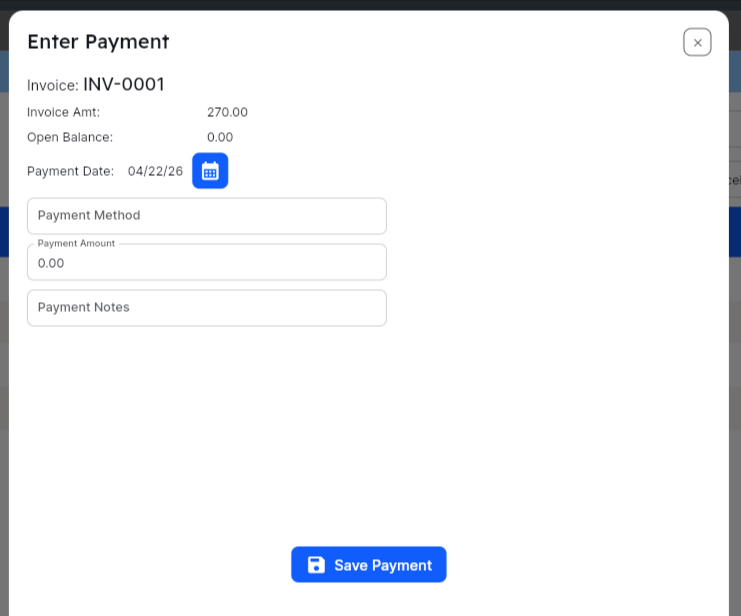
Enter the necessary information (Payment Method, e.g. Venmo, Amount, and any other Notes), and click Save.
The Customer App
Section titled “The Customer App”All invoice information will appear in the Customer App, just as if you created the invoice in an accounting system. A link will also be present for the customers to pay via the app.
Frequently Asked Questions
Section titled “Frequently Asked Questions”Can I invoice clients who aren’t on a recurring schedule? Yes. You can create an invoice for any client in your system at any time. Can I edit an invoice after sending it? Once an invoice is sent, you should void it and create a corrected version rather than editing in place. This keeps a clean audit trail. What currency does HWIT Invoicing use? Invoices are billed in the currency configured for your company account. Is there a record of all payments received? Yes. Every payment — whether via Stripe or recorded manually — is saved with the date, amount, method, and who recorded it. What if a client says they didn’t receive the invoice email? You can resend the invoice from the invoicing screen. Check that the email address on the client record is correct first. Can I switch to an integrated accounting system invoice later? You can always switch at any time — just know that it does require a “reset” at the database level, so it is not something you can do from the Setup screen. Simply email [email protected] with your request.