Prepayment Refunds, Write-offs and Corrections
This article covers the less common cases. For the everyday steps, see Taking and Using Prepayments.
Refund, write off or correct
Section titled “Refund, write off or correct”A. Go to Invoicing › Prepayments.
B. Click the customer.
C. Click Refund, write off or correct.
D. Choose Record refund, Write off or Correct.
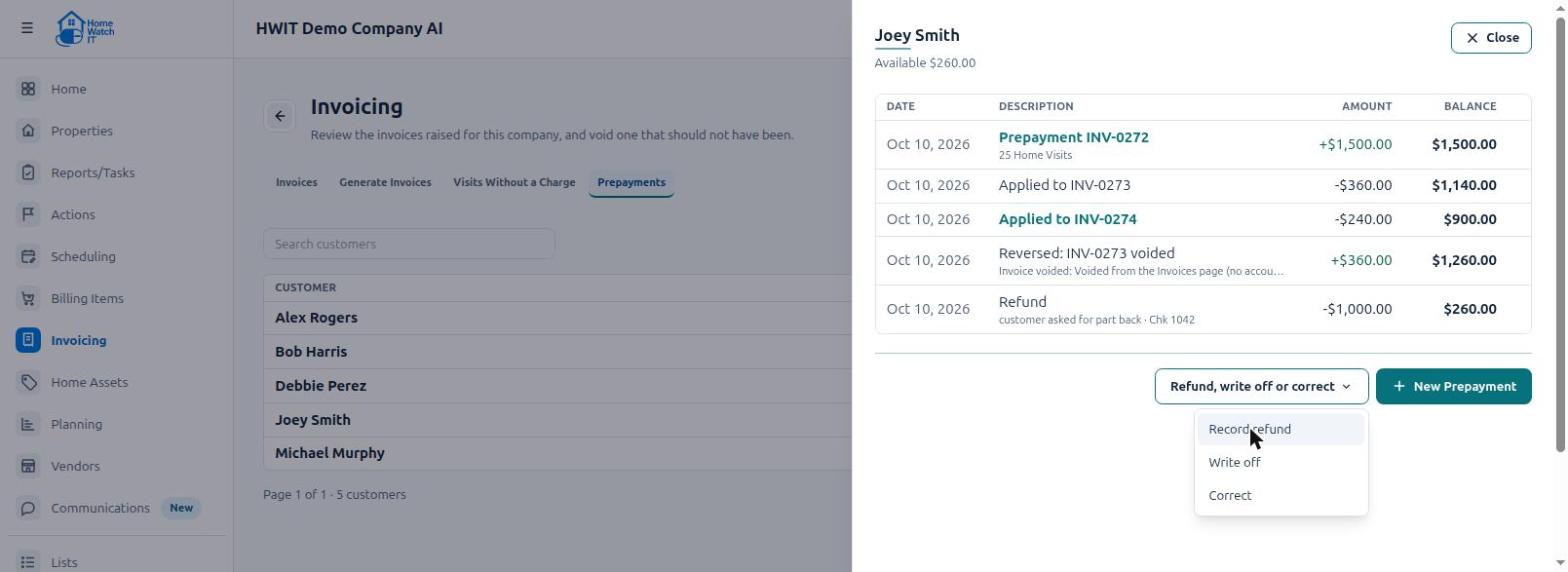
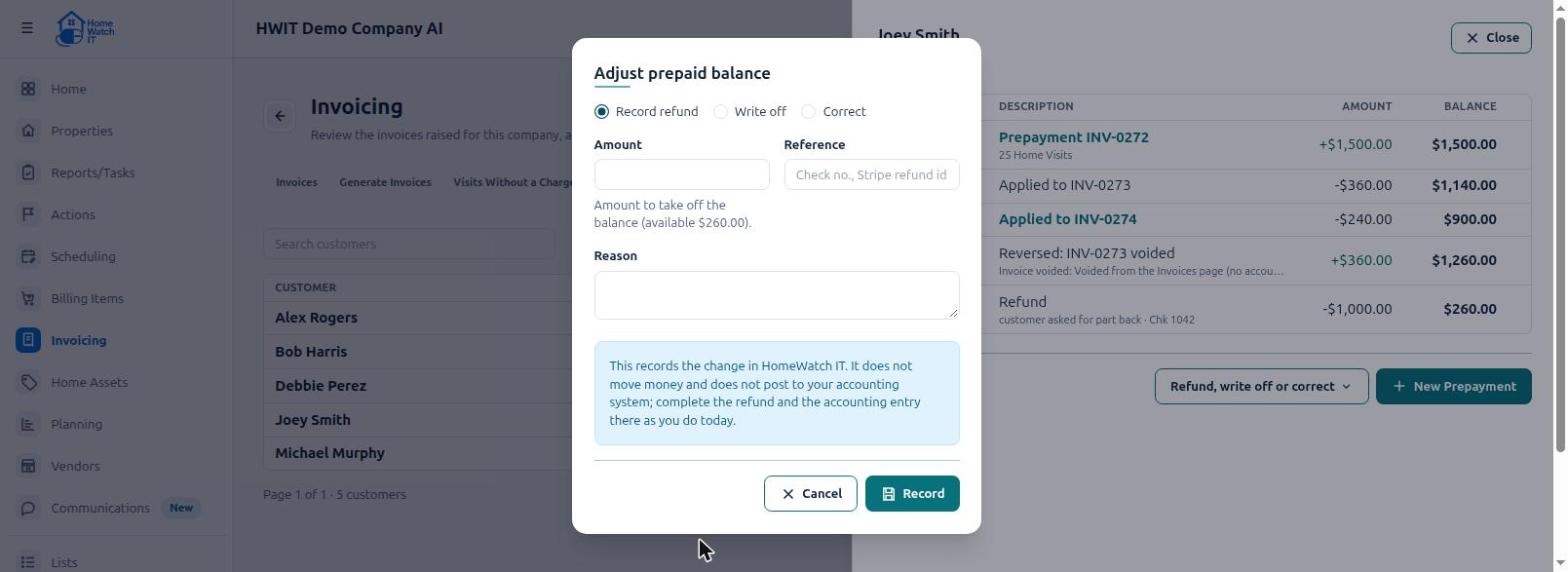
E. Fill in the form and click Record.
| Choose | Use it when | You enter |
|---|---|---|
| Record refund | You are giving money back to the customer. | The amount, a Reference (check number, Stripe refund ID…) and a Reason. |
| Write off | The money will not be used or returned (for example, the customer gave it up). | The amount and a Reason. |
| Correct | Fixing a mistake in the balance. Admins only. | A positive amount to add, or a negative amount to take off, and a Reason. |
You cannot refund or write off more than the customer has Available.
Voiding invoices
Section titled “Voiding invoices”An invoice that used prepaid money: void it as usual. The prepaid money goes back to the customer. The history shows Reversed: INV-… voided.
A prepayment invoice that is not paid yet: you can void it. It disappears from Pending.
A prepayment invoice that is already paid: you cannot void it. The customer’s money was received. Use Record refund or Write off instead.
”Needs attention” (QuickBooks and Zoho Books)
Section titled “”Needs attention” (QuickBooks and Zoho Books)”Every night, Home Watch IT checks each customer’s prepayments against QuickBooks or Zoho Books. If the two do not agree, the customer shows Needs attention. The customer’s history explains what is different — for example, a prepayment invoice was voided in QuickBooks.
A. Fix the difference in QuickBooks, Zoho Books or Home Watch IT.
B. Open the customer and click Resolve.
C. Write a short note about what you did, and save.
Home Watch IT never changes QuickBooks, Zoho Books or your prepayments by itself to make them match.
Frequently asked questions
Section titled “Frequently asked questions”Do I have to turn prepayments on?
Section titled “Do I have to turn prepayments on?”No. They are off until an Admin turns them on. Most companies never need them. See Introduction to Customer Prepayments.
Who can use prepayments?
Section titled “Who can use prepayments?”An Admin turns them on and off. Admins use the Prepayments tab under Invoicing. Only an Admin can record a Correction.
The customer has prepaid money. Why did they still get an invoice to pay?
Section titled “The customer has prepaid money. Why did they still get an invoice to pay?”Usually one of these:
- The prepaid money ran out part way through. The rest is invoiced normally.
- Some charges are on Item Codes that prepayments cannot pay for. See Choose which services prepayments can pay for.
- The prepayment invoice is still Pending (not paid yet).
Why is a customer’s prepayment still “Pending”?
Section titled “Why is a customer’s prepayment still “Pending”?”The prepayment invoice has not been paid yet. Prepaid money is only used once it is paid.
Can a prepayment renew automatically?
Section titled “Can a prepayment renew automatically?”No. When the money is used up, invoices are billed normally. Take a new prepayment when the customer wants to continue. The LOW label is a good reminder.
Can I take a prepayment for less than a full visit?
Section titled “Can I take a prepayment for less than a full visit?”Yes. Any amount works. If it does not cover a whole invoice, the rest is billed as normal.
Does the card surcharge come off the prepaid money?
Section titled “Does the card surcharge come off the prepaid money?”No. The surcharge is only charged on what the customer still owes after the prepaid money is used.
Can I pick which invoice the prepaid money is used on?
Section titled “Can I pick which invoice the prepaid money is used on?”No. It is used automatically on the next invoices you generate, oldest prepayment first.
I already took prepayments before using this feature. Can I bring those balances in?
Section titled “I already took prepayments before using this feature. Can I bring those balances in?”Yes, but not by yourself. Contact Home Watch IT support. We will load the existing balances with you.
I use Zoho. Can I use this?
Section titled “I use Zoho. Can I use this?”Zoho Books: yes. Turn on Retainer Invoices in Zoho first — see Introduction to Customer Prepayments. If you give money back, record the refund on the Retainer Invoice in Zoho too. Zoho Invoice: no. See Managing Customer Prepayments in Zoho.
I used to use QuickBooks credit memos for prepaid visits. What now?
Section titled “I used to use QuickBooks credit memos for prepaid visits. What now?”Do not use both for the same customer, or the customer is credited twice. Let the old credit memo be used up first. Then use Home Watch IT prepayments for that customer.
Can I turn prepayments off again?
Section titled “Can I turn prepayments off again?”Yes, when no customer has prepaid money left and no prepayment invoice is unpaid. Your history is kept.