Report Creation and Visit Form Horizons
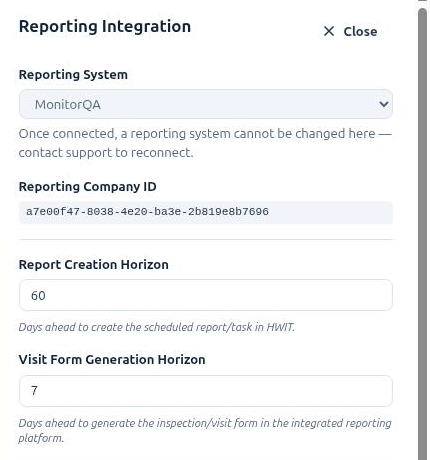
Your schedules run indefinitely, but HWIT only creates the actual reports and tasks a certain distance into the future. Two settings control that distance. Both live in Settings → Integrations: on the Reporting Integration row click Manage reporting integration.
Report Creation Horizon
Section titled “Report Creation Horizon”Days ahead to create the scheduled report/task in HWIT. Default: 60.
Every morning the scheduler looks at each active schedule and creates any report or task that falls within this many days, so the Reports/Tasks list, the Scheduling calendar, route planning and the Customer App always show that much of the future.
- Raise it (say to 90 or 120) if you plan technicians’ weeks well in advance, or if customers like to see their visits further ahead in the Customer App.
- Lower it if long pending lists get in the way. Reports are only created inside the window, so a shorter horizon keeps the pending list to what is coming up soon.
Changing the value takes effect on the next morning run. Raising it creates the extra reports; lowering it does not delete reports that already exist.
Visit Form Generation Horizon
Section titled “Visit Form Generation Horizon”Days ahead to generate the report form in the integrated reporting platform. Default: 7.
This one only appears when MonitorQA or SafetyCulture is your reporting system. HWIT creates the report in its own list first (per the Report Creation Horizon), and then, this many days before the visit, creates the matching blank report form in MonitorQA or SafetyCulture so it is waiting for the technician in the reporting app.
Keeping this short (a week or so) is deliberate: a report form is created with the version of the template that is current at that moment, so generating forms late means template edits reach more of your upcoming visits without needing Recreate All Reports (see Editing a Report Template). Raise it if your technicians like to see further ahead inside the reporting app, or if you often work offline and want forms downloaded earlier.
Companies on HWIT’s built-in reporting don’t need this setting — the mobile app reads the template live.
- Both values must be a whole number of days, 1 or more.
- Each value saves as soon as you leave the field; a confirmation appears.
- The Visit Form Generation Horizon should be shorter than or equal to the Report Creation Horizon — a form can’t be generated for a visit that doesn’t exist yet.